

Unisub 4857 One-Sided Dog Bone Aluminum Ornament
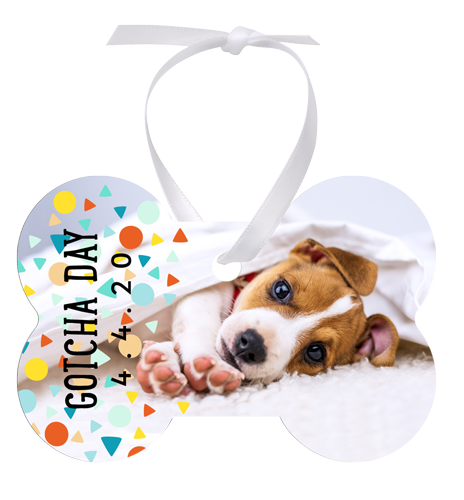
One-Sided dog bone sublimation ornament in aluminum, with a gloss white finish. Measures 2.12 × 3.25 in. Personalize with photos, names or seasonal designs.
Share :
Create a personalized hanging keepsake with the Unisub 4857 dog bone ornament. Use the single printable surface for photographs, artwork or a name and date.
Key Features
- Dog Bone shape for hanging display.
- One-Sided sublimation blank.
- Gloss White finish on aluminum.
- Dimensions: 2.12 × 3.25 in.
- Thickness: 0.045 in.
- Supplied unprinted for your own personalization.
Applications
Pet portraits, memorial keepsakes, adoption anniversaries and gifts for dog owners.
Technical Specifications
| Brand | Unisub |
| Manufacturer item | 4857 |
| SKU | US 4857 |
| Material | Aluminum |
| Shape | Dog Bone |
| Dimensions | 2.12 × 3.25 in |
| Thickness | 0.045 in |
| Finish | Gloss White |
| Printable sides | One |
| Personalization | Dye sublimation |
What’s Included
Blank aluminum ornament. White ribbon included. Decorated product images illustrate possible personalization. Order according to the selling unit on this listing; printing supplies are separate.
How to Personalize
Valuerite recommended settings: 385°F / 195°C; 50–60 seconds for the printable side. These follow the previously approved Valuerite approach using Unisub’s aluminum bag-tag guidance. Pressure is not specified in that guide; confirm your press setup and test before a production run.
- Prepare a sublimation transfer to suit the ornament shape, allowing bleed and keeping important details away from edges and hanging holes.
- Remove protective film from the printable surface, where present, and clean with a lint-free cloth.
- Align the transfer with the printable face and secure it with heat-resistant tape.
- Place fresh protective paper below and above the work. Position the transfer above the face being printed and use the appropriate settings.
- Use heat-resistant gloves to remove the hot piece. Allow it to cool before finishing.
- Thread and tie a suitable ribbon through the hanging hole after cooling.
How-To Video
How to Sublimate an Aluminum Ornament — official Unisub tutorial.
Care and Support
Handle the printed faces carefully and store ornaments separately to avoid scratches. Use a soft cloth for routine cleaning. Contact Valuerite with the item number for help selecting blanks, preparing artwork or setting up your sublimation workflow.
Downloads
- Unisub ornament preparation instructions
- Unisub aluminum bag-tag guide — basis for Valuerite settings
- Unisub product catalogue (PDF)
Specifications: existing Valuerite item US 4857. This legacy item is not individually confirmed in the current public catalogue; check the blank against the correct template before production.